

Video Guide: Setting up Integrations
Overview
Webhooks allow you to bridge Snowie.ai with your external tech stack. By configuring a webhook, you can instantly push call data to platforms like Zapier, Make, or Slack immediately after a conversation ends.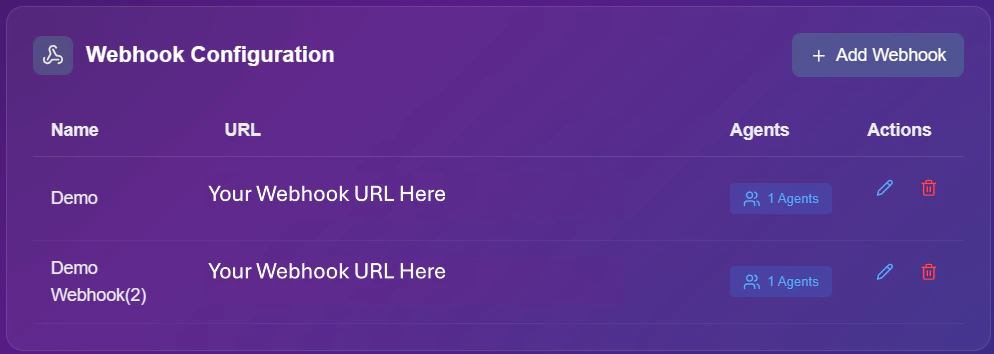
Webhook Management Dashboard
Managing Webhooks
Use the control panel actions to maintain your existing connections.View Agents
Click the “Agents” button to see exactly which assistants are currently triggering this webhook.
Edit Webhook
Update the Webhook Name, change the Destination URL, or modify the Selected Agents.
Delete
Permanently remove a webhook if it is no longer needed.
Adding a Webhook
Follow these steps to set up a new real-time data stream.1
Initiate Setup
Click the + Add Webhook button located in the top right corner of the dashboard.
2
Configure Credentials
Enter the core details for your integration:
- Name: Give your webhook a recognizable label (e.g., “Zapier Lead Sync”).
- URL: Paste the destination endpoint provided by your automation tool.
3
Assign Agents
Decide which assistants will use this integration.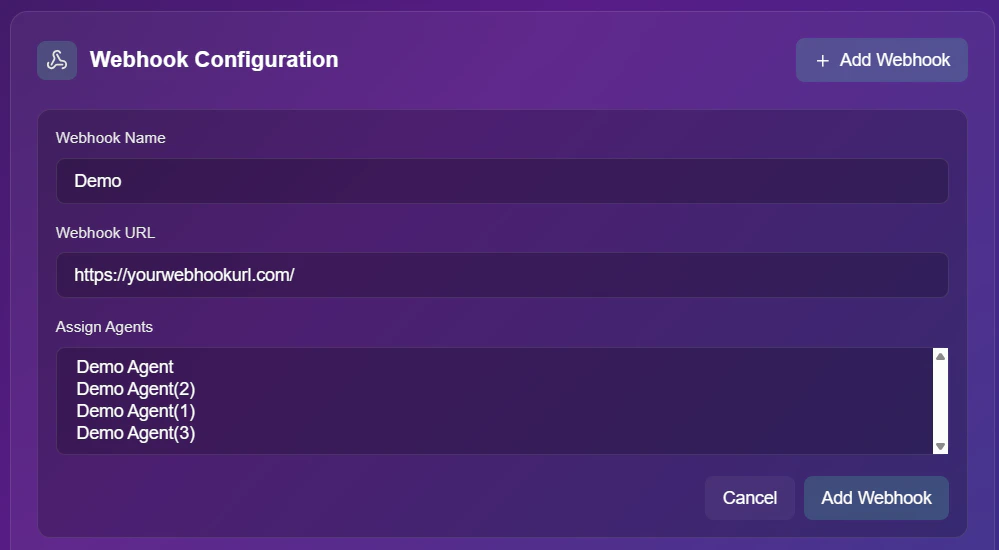
- Selection: You can choose “All Agents” to trigger for every call, or select specific bots like “Sales Bot”.