> ## Documentation Index
> Fetch the complete documentation index at: https://support.snowie.ai/llms.txt
> Use this file to discover all available pages before exploring further.
# My Profile
> Manage your account details and security
## Overview
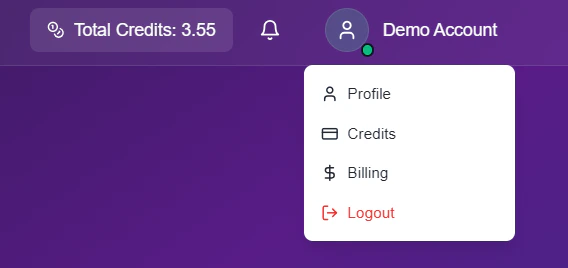
Your **Profile** section is the command center for your personal identity and security settings. To access it, simply click your avatar in the top-right corner and select **Profile**.
 ## Account Details
Update your contact information to ensure your invoices and notifications reach the right place.
## Account Details
Update your contact information to ensure your invoices and notifications reach the right place.
 ### Profile Fields
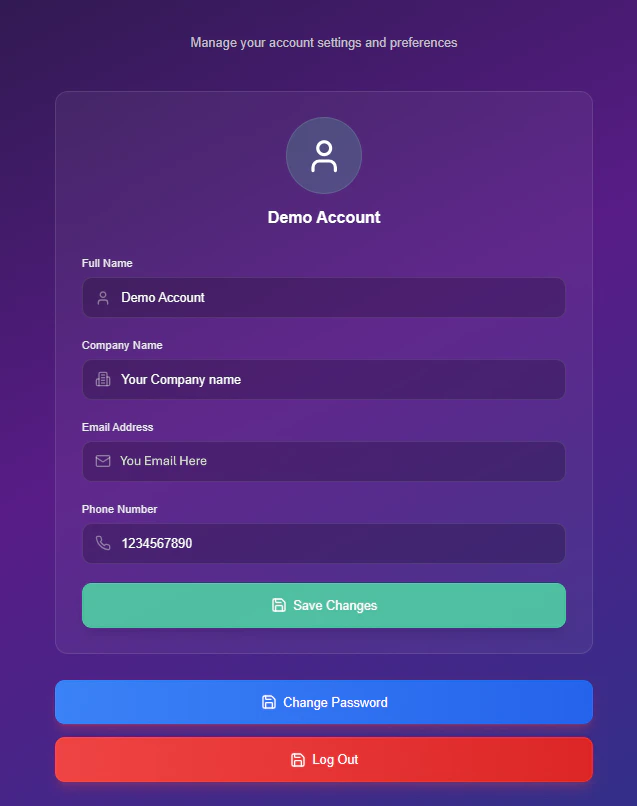
* **Full Name:** This will be your display name across the dashboard.
* **Company Name:** This appears on all your official invoices.
* **Phone Number:** Your direct line for account support.
* **Email Address:** Your unique login ID (Read-Only).
**Locked Field:** For security reasons, you cannot change your email address directly. If you need to update your login email, please contact our support team.
***
## Security Settings
Follow this secure workflow to update your password.
Click the blue **Change Password** button located at the bottom of the profile card.
A security modal will appear to confirm the request.
### Profile Fields
* **Full Name:** This will be your display name across the dashboard.
* **Company Name:** This appears on all your official invoices.
* **Phone Number:** Your direct line for account support.
* **Email Address:** Your unique login ID (Read-Only).
**Locked Field:** For security reasons, you cannot change your email address directly. If you need to update your login email, please contact our support team.
***
## Security Settings
Follow this secure workflow to update your password.
Click the blue **Change Password** button located at the bottom of the profile card.
A security modal will appear to confirm the request.
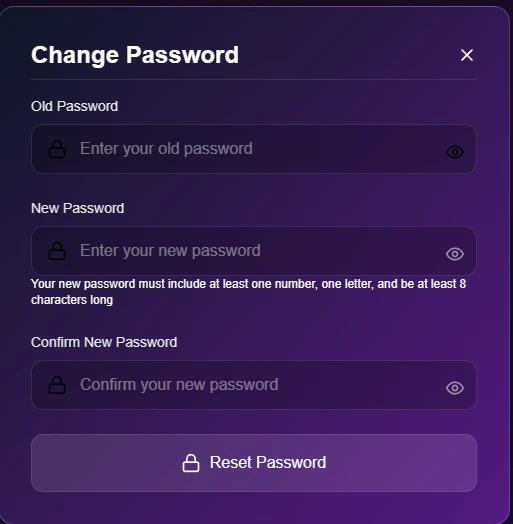 * **Old Password:** Enter your current password to authorize the change.
* **New Password:** Create a strong password (must include numbers and letters).
* **Confirm:** Retype the new password to prevent typos.
Click **Reset Password** to finalize the change.
* **Old Password:** Enter your current password to authorize the change.
* **New Password:** Create a strong password (must include numbers and letters).
* **Confirm:** Retype the new password to prevent typos.
Click **Reset Password** to finalize the change.